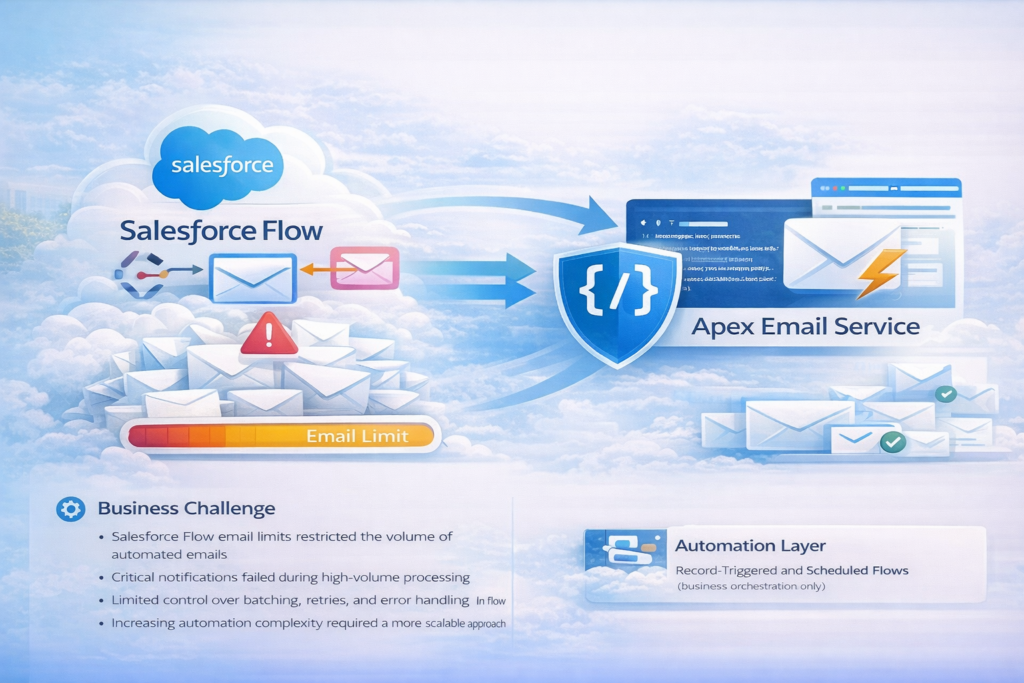
Overview
Addressing Salesforce email-sending limitations within Flows, which were impacting business-critical notifications and automation reliability. To ensure scalability, compliance with platform limits, and consistent email delivery, the existing Flow-based email implementation was strategically migrated to an Apex-based solution.
The new design provided greater control over execution, improved error handling, and optimized email volume management while maintaining seamless integration with existing automation.
Business Challenge
- Salesforce Flow email limits restricted the volume of automated emails
- Critical notifications failed during high-volume processing
- Limited control over batching, retries, and error handling in Flow
- Increasing automation complexity required a more scalable approach
Solution Approach
A controlled migration was executed where email logic was removed from Flows and reimplemented using Apex-based email services, while Flows continued to orchestrate business logic.
Key elements of the solution
- Centralized email sending through Apex classes
- Flow-to-Apex invocation using Invocable Methods
- Bulk-safe processing to manage high email volumes
- Configurable templates and recipients
Implementation Highlights
Apex-Based Email Framework
- Implemented bulkified Apex email services
- Used Messaging.SingleEmailMessage and Messaging.SendEmailResult for control and tracking
- Supported transactional and notification emails
Flow & Apex Integration
- Flows invoke Apex email logic via Invocable Apex Actions
- Email logic fully decoupled from Flow execution
- Maintained existing business automation without redesign
Limit & Performance Optimization
- Reduced Flow execution complexity and runtime limits
- Controlled batching to stay within daily and per-transaction email limits
- Improved system stability during peak processing
Error Handling & Monitoring
- Centralized exception handling in Apex
- Logging of email failures and response statuses
- Optional retry logic for transient failures
Technical Architecture
Automation Layer
- Record-Triggered and Scheduled Flows (business orchestration only)
Service Layer
- Apex Email Service (bulkified, limit-aware)
Configuration Layer
- Email templates (Salesforce templates / HTML)
- Custom Metadata for recipient rules and feature toggles
Monitoring
- Apex logs and custom email tracking objects
- Admin alerts for critical failures
Outcomes & Benefits
- Eliminated Flow email limit constraints
- Improved reliability of email notifications
- Scalable solution supporting high-volume use cases
- Better control over execution, monitoring, and retries
- Cleaner separation of orchestration (Flow) and execution (Apex)